An evidence-first look
A neural4d review focused on what you can verify
This neural4d review is a guide to evaluating an image-to-3D workflow, not a report of independently tested results. Neural4d can help frame what to look for, but a polished preview alone cannot establish that a model will suit your project.
how it used to be done
Before judging a generated model, it helps to separate the questions people often bundle into a single review.
how it is done today
A useful review starts with your intended use, then examines the result rather than stopping at the first attractive image.
-
1
Define the job
Write down whether you need a concept preview, a reference for further modeling, or an asset for a particular project. Those goals call for different standards of evidence.
-
2
Inspect the whole object
Look beyond the best-lit angle. Check whether the silhouette, small parts and less-visible surfaces remain coherent as the object turns.
-
3
Test your workflow
If you can obtain a model, verify the available file, geometry and materials in the software where you intend to use it. Record any cleanup you must do yourself.
what changed
The shift from judging a still image to judging a usable asset changes what a review needs to establish. Neither column below is a verified product specification.
Preview-led assessment
Project-led assessment
Starting question
Preview-led assessment
Does the showcased view look convincing?
Project-led assessment
Will the result meet the requirements of my project?
Shape
Preview-led assessment
Judge the visible silhouette.
Project-led assessment
Inspect the silhouette from several angles.
Hidden areas
Preview-led assessment
Usually cannot be assessed.
Project-led assessment
Check backs, undersides and occluded parts.
Surface
Preview-led assessment
Lighting can make details appear complete.
Project-led assessment
Examine surfaces and materials in the intended software.
Geometry
Preview-led assessment
A rendered image does not reveal mesh quality.
Project-led assessment
Inspect the mesh if an accessible model is available.
Workflow fit
Preview-led assessment
Assume the preview represents a usable result.
Project-led assessment
Confirm the available output works with your actual tools.
who switched
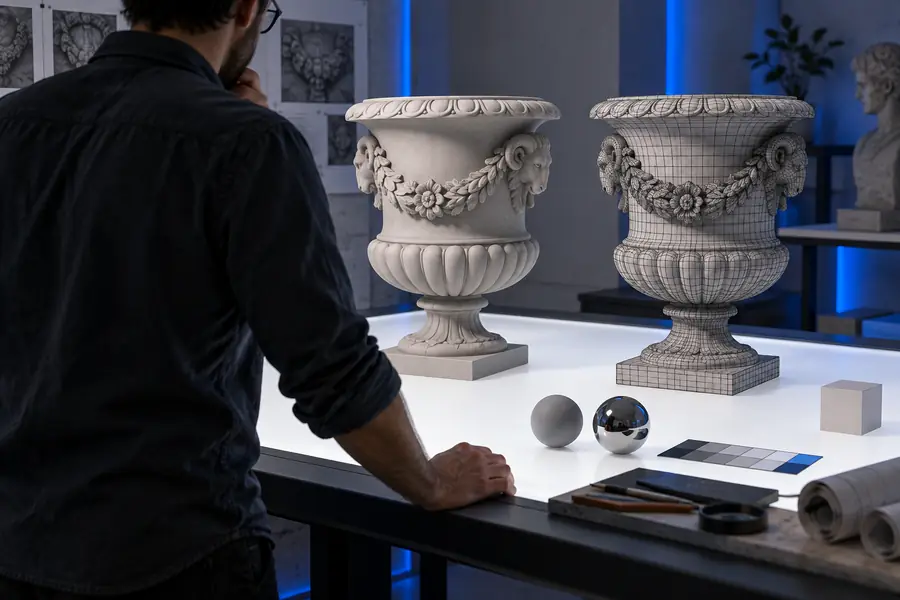
People moving from visual exploration toward asset evaluation need a stricter inspection habit. These two site illustrations show why visual detail is only one part of that decision.
- Inspect visible structure
- Inspect added detail
These are illustrative site images, not verified before-and-after outputs from one generation. Appearance alone cannot show how either model is built.

Limits of this review
An honest neural4d review should say where its evidence ends. This page offers evaluation criteria, not a hands-on certification of the tool or its results.
-
It cannot verify current access terms
The available evidence does not establish what features, if any, are accessible without payment or an account.
WorkaroundCheck the destination's current terms before planning a workflow around it.
-
It cannot certify output quality
Site imagery does not prove that a generated file has clean geometry, complete surfaces or suitable materials.
WorkaroundInspect an output you can access in the software you actually use.
-
It cannot promise a supported format
The supplied information does not confirm export formats or compatibility with a particular editor or engine.
WorkaroundConfirm the available export options before committing to a project.
-
It cannot establish repeatability
A single appealing example cannot show how consistently similar inputs produce useful results.
WorkaroundTry several representative inputs and compare the outcomes against the same checklist.
Make your own assessment
Test against your real project
If the workflow sounds relevant, take a representative reference and a short list of requirements to the destination. Judge the result by the full object and its usefulness in your tools, not just by its presentation image.
Explore 3D creation- Check multiple views
- Inspect any accessible model
- Confirm current access and export options
its own FAQ
No. This is an evidence-limited guide to assessing the workflow and its results, not a claim that we independently generated or tested a model. Use the inspection criteria here when you can examine an output yourself.
Look for examples shown from more than one angle and a clear account of what was actually tested. If you need an editable asset, evidence about the model in your intended software matters more than a polished still image.
No. A preview can show how an object appears under particular lighting and framing, but it cannot by itself establish mesh quality, hidden surfaces or file compatibility. Inspect an accessible model before relying on it.
No. The information available for this page does not verify current formats, limits or access requirements. Confirm those details at the destination before making them part of your plan.