
Software neural4d

Shape a neural4d mockup from your idea

A neural4d mockup is most useful as an early visual study, not proof that a production-ready 3D asset exists. Describe the subject, appearance, and viewpoint you want to explore, then inspect what the available tool actually produces.

Opens the linked creation tool
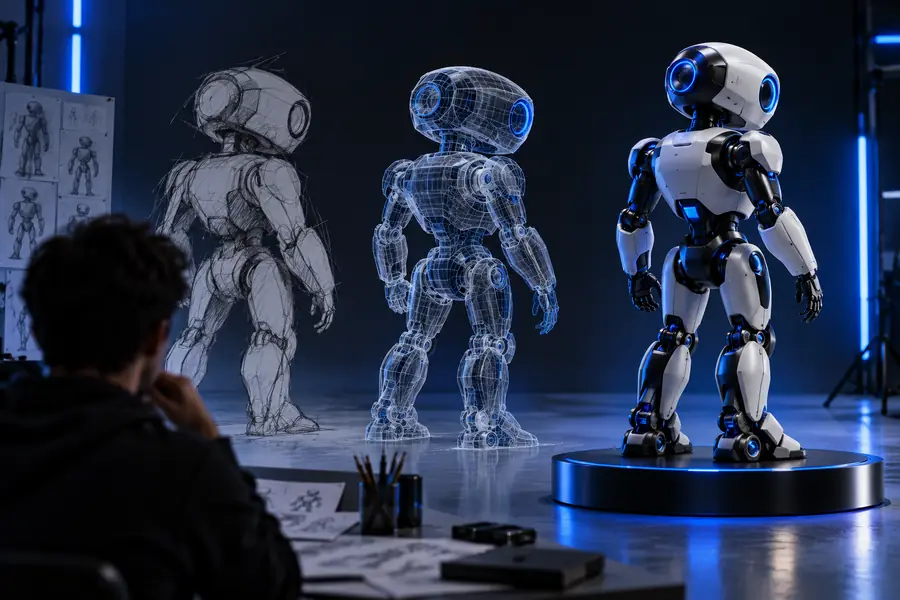
Illustrative 3D concept imagery for an early visual study

The word mockup can mean a concept image, a model preview, or a presentation scene. These related guides help separate those goals before you start.

Three decisions behind a convincing concept

A useful neural4d brief identifies what viewers should recognize, what the scene should communicate, and what still needs checking. Different teams will judge the same mockup differently.

Product designer

Explore the silhouette of a small desk device before settling dimensions or materials.

Keep the recognizable controls consistent across views; treat surface detail as a proposal, not an engineering specification.

neural4d for 3d models

Creative director

Test whether a character concept reads clearly in a presentation.

Request a simple background and a deliberate viewpoint so the mockup does not hide the character's shape.

neural4d review

Game artist

Compare visual directions for a prop before building the asset.

Use the preview to discuss form and color, then assess topology and integration separately.

neural4d vs 3d model

Small studio

Prepare a concept to show a client without implying the final deliverable is complete.

Label the image as an exploratory mockup and agree on the next production check.

neural4d software

From brief to review

This is a planning workflow, not a claim that every control or output format is available through the linked tool.

  1. 1

    Define one subject

    State the object's main shape, distinctive features, intended use, and preferred viewing angle. For a neural4d concept, a focused description is easier to evaluate than several competing ideas.

  2. 2

    Explore a visual direction

    Open the linked creation tool and check its current options. If it accepts your description, use it to explore the mockup; otherwise adapt the brief to the inputs it offers.

  3. 3

    Review before presenting

    Compare the result with the original brief. Check the silhouette, visible parts, material cues, and any details that would matter if the idea later became a 3D asset.

Where a mockup stops

A persuasive image can settle a visual conversation while leaving important production questions open. Neural4d-inspired concept work still needs independent checks.

  • Not verified geometry

    A visual preview does not establish that clean, editable 3D geometry exists behind it.

    WorkaroundInspect an actual model in your intended editor before committing to a model-based workflow.

  • Not a manufacturing specification

    Apparent thickness, joints, and materials in a mockup are visual suggestions, not measured or tested properties.

    WorkaroundRecord dimensions and constraints separately, then validate them with the relevant specialist.

  • Not guaranteed consistency

    A single view cannot confirm how the subject looks from every angle or whether repeated details align.

    WorkaroundRequest or create additional views and compare identifying features across them.

  • Not a confirmed export path

    This page does not verify which files, editing controls, or export options the linked tool currently provides.

    WorkaroundCheck the tool's live interface and test the required handoff before planning downstream work.

Visual study or production asset?

Use this comparison to describe what you have, rather than calling every dimensional-looking image a finished model.

1

Primary purpose

Concept mockup

Communicate an appearance or direction

Validated 3D model

Supply geometry for a defined workflow

2

Viewing angles

Concept mockup

May show only a chosen view

Validated 3D model

Can be inspected from multiple angles

3

Shape accuracy

Concept mockup

Judged visually against the brief

Validated 3D model

Checked against geometry and dimensions

4

Surface detail

Concept mockup

Suggests color and material

Validated 3D model

Requires usable surface data where the workflow needs it

5

Editability

Concept mockup

Cannot be assumed from an image

Validated 3D model

Must be tested in the intended application

6

Approval question

Concept mockup

Does the concept look right?

Validated 3D model

Does the asset meet technical requirements?

Reference and presentation are different views

  • Concept reference
  • Presentation study

These are illustrative images, not a documented before-and-after conversion. Compare the visible design choices without assuming the second image contains editable geometry.

Illustrative robot concept image used as a visual reference
Illustrative mockup presentation image

Take the concept to the next tool

Explore your visual direction

Bring a focused brief to the linked creation tool and inspect its current capabilities. Keep your neural4d mockup labelled as a concept until you have checked any model or export requirements your project depends on.

Explore the tool
  • Start with a recognizable subject
  • Judge the visible result against your brief
  • Verify technical deliverables separately

Mockup questions

It can help communicate a proposed look before you commit to detailed production work. Treat the result as a visual study unless you have independently verified that it includes the model data your project needs.

No. A mockup may show how an object could look, while a usable 3D model requires geometry and whatever editing or export properties the downstream workflow demands. An image alone cannot establish those properties.

Name the subject, its defining shapes, a few important materials or colors, and the viewpoint. Add the intended audience or use if that changes what must be visible. Avoid treating decorative details as confirmed specifications.

That depends on what you agreed to deliver. A labelled concept image may be suitable for an early presentation, but it should not be presented as an editable or production-ready asset without verification.

Open its current interface and inspect the available inputs and outputs. Test a small representative task, then verify the resulting files and editing options in the application where you intend to use them.

Start creating
Start creating